Synergy Bursts
In Pokkén Tournament, there's a special meter next to your health bar called the Synergy Gauge. Here’s how it works and how to use it:
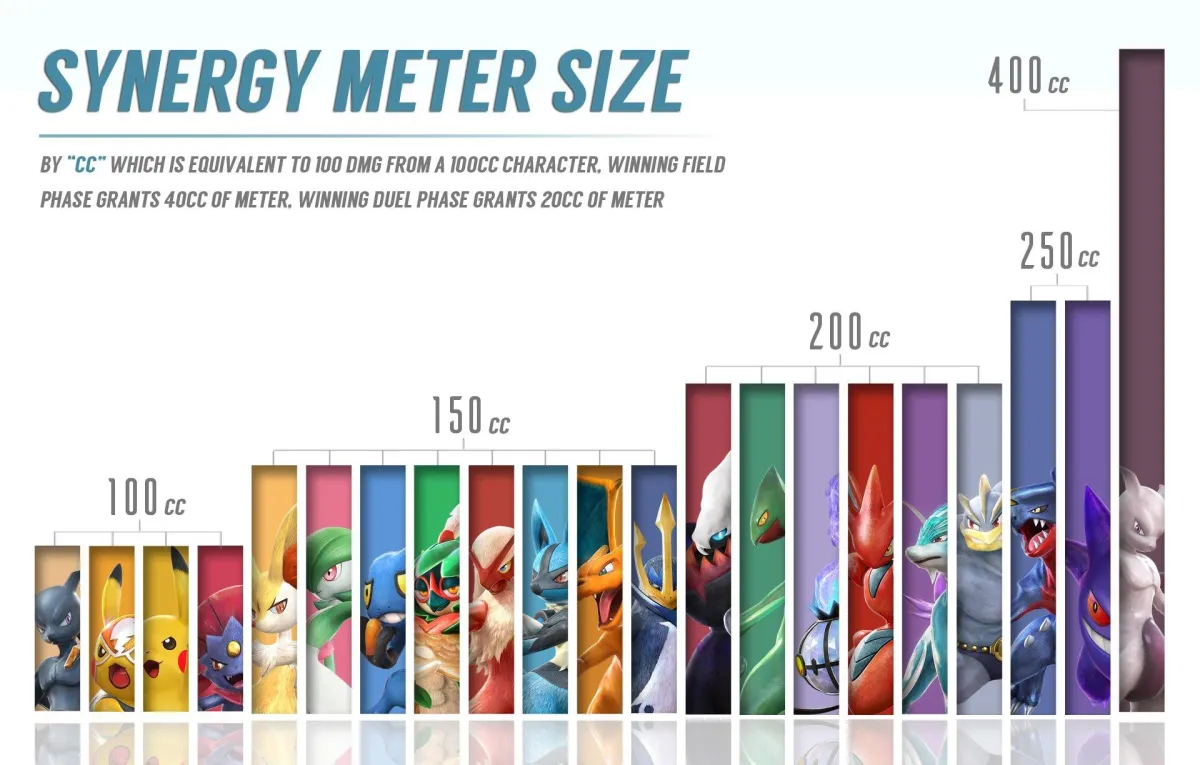
Image source: Burnside
Building Your Synergy Gauge
Gaining Synergy: You can fill up this gauge by engaging in various actions during a battle. These actions include:
Attacking your opponent whether you hit them or miss (whiff)
Going through a phase shift (when the battle mode changes)
Taking damage from the opponent
Using moves that let you withstand (armor through) attacks
Picking up Synergy orbs that appear on the ground during the fight
Meter Requirements: Each character in the game needs a different amount of this "synergy" to fill their gauge fully, depending on their specific traits.
Using Your Synergy Burst
Activating Burst Mode: Once your Synergy Gauge is full, you can activate what's called "Synergy Burst" or "Burst Mode" by pressing two buttons together (usually L + R).
Effects of Burst Mode:
Initial Impact: Activating Burst Mode makes your character temporarily invincible, creates a shockwave that pushes enemies back, breaks through their defenses, and resets your phase shift points to zero.
During Burst Mode: Your character becomes stronger, gaining: 1) A 10% increase in attack and defense power 2)A slight increase in speed 3) "Light armor", which means you can ignore up to 9 minor attacks before they affect you.
Health Recovery: Burst Mode also allows you to start regaining some lost health (referred to as "grey life")
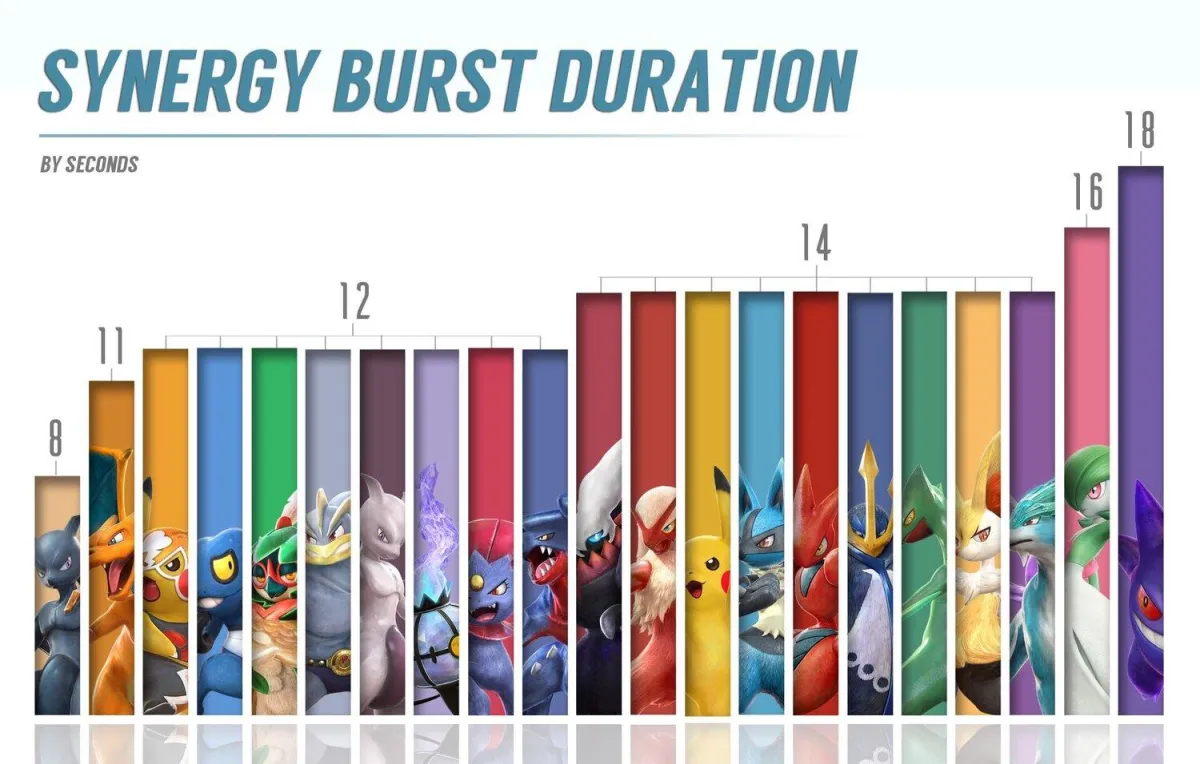
Image source: Burnside
Burst Attack: While in Burst Mode, pressing L + R again unleashes a powerful move called a "Burst Attack" or "Super", which is very strong and often makes your character invincible at the start.
Character Specifics
Unique Traits: Each character experiences unique enhancements in Burst Mode, affecting their abilities and making some characters, like Gengar and Lucario, extremely formidable. Duration: Each character remains in Burst Mode for a set period before the Synergy Gauge runs out and they return to normal.
Support Gauge and Support Pokémon
In Pokkén Tournament, there are several tools at your disposal to help during battles, including the Support Gauge and Support Pokémon. Here's a simplified explanation:
Support Gauge: This is an icon located above your Synergy Gauge. It fills up over time during the match. When it’s fully charged, you can call a Support Pokémon to help you.
Types of Supports:
Attack Supports: These are Support Pokémon that perform attacks to hit your opponent.
Disrupt Supports: These are more defensive, helping to protect you or interrupt the opponent's moves. Some can even provide a momentary shield.
Enhance Supports: These Supports offer various boosts, such as healing you, increasing your attack power, or speeding up your Synergy Gauge fill rate.Choosing Supports: Different players choose different Supports based on their play style and the specific needs of their main character. For example, a character that loses health quickly might use a Support that can heal.
Managing Supports
Charging Time: The time it takes for your Support Gauge to fill varies depending on which Support Pokémon you choose. There’s a chart by Burnside on Twitter that lists accurate charging times:
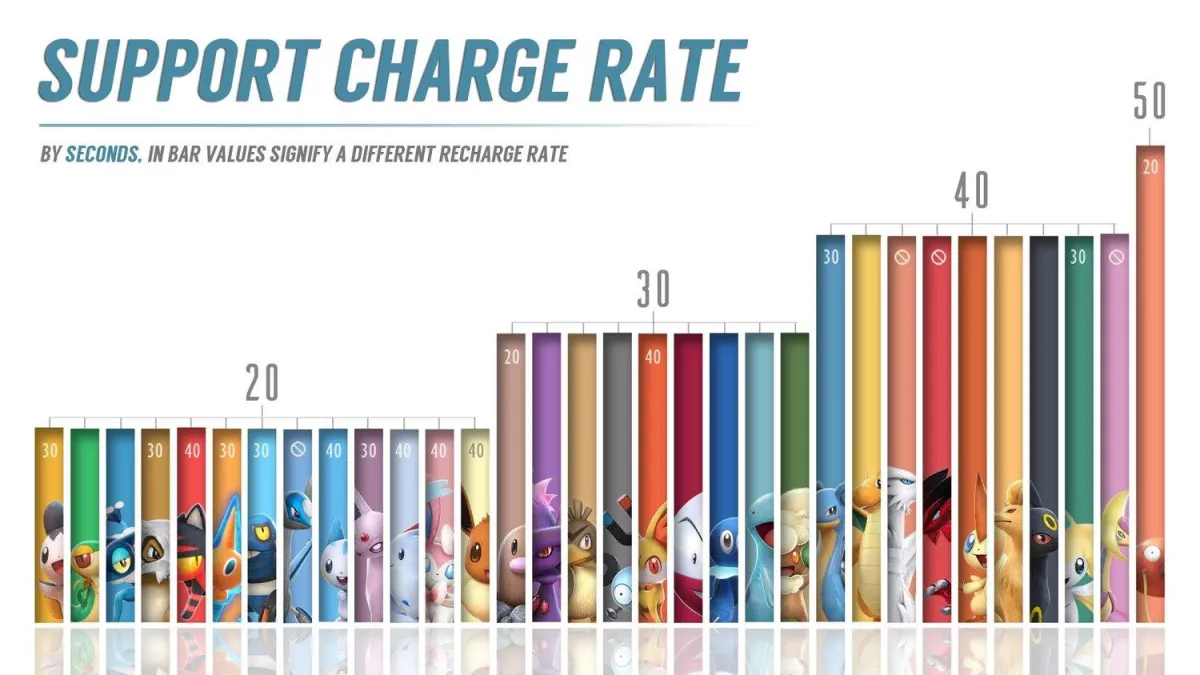
Image source: Burnside
Tactics Against Supports
Vulnerability: Most Supports aren’t invincible from the moment they're called. You can often interrupt them with a well-timed attack or throw.Positioning: Supports usually appear from the right side of your character. In many cases, you can move to the right to dodge or even counterattack against a Support.Pattern Recognition: Like many aspects of fighting games, noticing when your opponent likes to use Supports can let you prepare to dodge or counter them effectively.
Cheer Skills
Boosts from Cheers: Cheer Skills affect how quickly your Support and Synergy Gauges fill. Experiment with different Cheer Skills to see which one best complements your strategy and play style.
Welcome to PokéChest, your ultimate destination for Pokémon TCG and beyond! We also have an extensive range of toys and stationary featuring Sanrio and other Japanese anime for you to explore! For those seeking for thrilling game experiences, check out our Pokkén Tournament Arcades and gashapon machines in store!
Visit Us In Store
Address:
Unit 841-5300 No. 3 Road, Richmond BC (Located inside Lansdowne Centre)
Store Phone Number:
604-902-8746
Copyright 2024. All Rights Reserved. PokéChest.